Settings
Open Settings with ☀ in the sidebar footer. Changes apply when you click Save (the master password section acts at once).
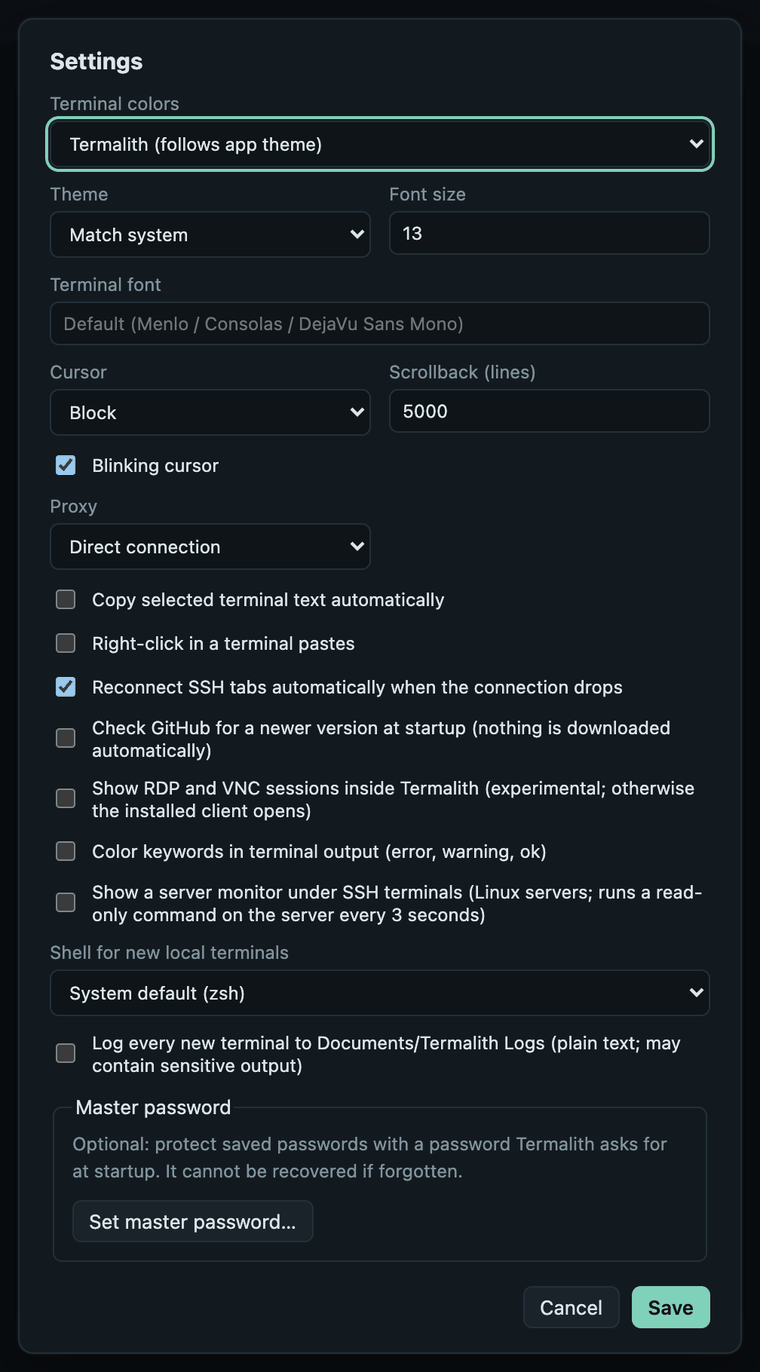
| Setting | What it does |
|---|---|
| Terminal colors | Color scheme for terminals: follows the app theme, or Solarized Dark/Light, Nord, Gruvbox Dark, Tomorrow Night. A session can override it (per-session look). |
| Theme | App theme: Match system, Dark or Light. |
| Font size | Terminal font size (8–32). |
| Terminal font | Any installed monospace font; empty uses Menlo (macOS), Consolas (Windows) or DejaVu Sans Mono (Linux). |
| Cursor | Block, bar or underline. |
| Scrollback (lines) | How many lines each terminal keeps (100–100,000). |
| Blinking cursor | Makes the cursor blink. |
| Proxy | Direct connection, SOCKS5 or HTTP (CONNECT) for SSH and Telnet. Only the first hop uses it; FTP/FTPS refuse to connect while a proxy is set. |
| Proxy host and port | The proxy server (default port 1080 for SOCKS5, 3128 for HTTP). |
| Proxy user name (optional) and Proxy password | Login for the proxy (SOCKS5 user/password or HTTP Basic). The password is kept in the system keychain; Forget the saved proxy password removes it. HTTP proxies receive it in the clear. |
| Copy selected terminal text automatically | Selecting text copies it, like many Linux terminals. |
| Right-click in a terminal pastes | Right-click pastes instead of opening a menu. |
| Reconnect SSH tabs automatically when the connection drops | Reconnects after 5 seconds, with a Cancel button. |
| Check GitHub for a newer version at startup | Looks for a newer release when Termalith starts; nothing is downloaded. |
| Show RDP and VNC sessions inside Termalith | Opens desktops in a tab instead of the installed client (Remote desktop). |
| Color keywords in terminal output | Shows error, warning, ok and similar words in color. |
| Show a server monitor under SSH terminals | CPU, load, memory, disk and network of Linux servers, refreshed every 3 seconds. |
| Shell for new local terminals | Default shell for Local (shown when more than one is installed). |
| Log every new terminal to Documents/Termalith Logs | Writes every new terminal's output there as plain text. Logs may contain sensitive output. |
| Master password | Encrypts saved passwords with a password asked at startup; Set, Change, Turn off or Lock now (details). |